First capital letter in Excel
There are times that we have a text that should be seen as its own name and is like anything, the good thing is that excel has a function that is very simple to use and that really saves a lot of time, suppose we have the following text:nn nnnnY we need the text to be written as its own name, then we will use the functionn
NOMPROPIO()
nThat will give us the first letter of each word in capital, as we can see below:nn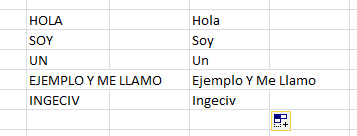 nnnnAs you can see it is quite simple to do, but it is quite useful to have all this knowledge before hand so you don’t get to work others.