How to add hours in Excel
Excel has given me more than a headache at the time of adding hours, because by default this program doesn’t add up more than 24 hours, but don’t worry it’s pretty easy to fix the problem, so let’s start with this tutorial about how to correctly add hours in ExcelSuppose we have two cells, one with 12 hours and the other with 20 hours: nnnnTo fix this little detail, we simply have to go to the number formatting option, located at the top of the menu:nn
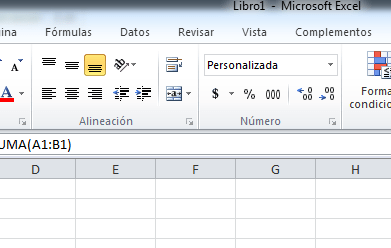 nnnn & then select
More Number Formats
No, no, no, no, no, no, no, no, no, no, no, no, no, no, no, no, no, no, no, no, no, no, no, no, no, no, no, no, no, no, no, no, no, no, no, no, no, no, no, no, no, no, no, no, no, no, no, no, no, no, no, no, no, no, no, no, no, no, no, no, no, no, no, no, no, no, no, no, no, no, no, no, no, no, no, no, no, no, no, no, no, no, no, no, no, no, no, no, no, no. no, no, no, no, no, no, no, no, no, no, no, no, no, no, no, no, no, no, no, no, no, no, no, no, no, no, no, no, no, no, no, no, no, no, no, no, no, no, no, no, no, no, no, no, no, no, no, no, no, no, no, no, no, no, no, no, no, no, no, no, no, no, no, no, no, no, no, no, no, no, no, no, no, no, no, no, no, no, no, no, no, no, no, no, no, no, no, no, no, no, no, no, no, no, no, no, no, no, no, no, no, no, no, no, no, no, no, no, no, no, no, no, no, no, no, no, no, no, no, no, no, no, no, no, no, no, no, no, no, no, no, no, no, no, no, no, no, no, no, no, no, no, no, no, no, no, no, no, no, no, no, no, no, no, no, no, no, no, no, no, no, no, no, no, no, Once there, let’s go to where it says Custom and just the time we put it in square brackets, in this way the sum will show us 32, which should be the result that we are really looking for. I hope this tutorial has been helpful, plus anything do not hesitate to leave a comment.nnPdta: I leave the file in excel, so you can look at it in case you haven’t understood anything you’ve written here, you can download it by Here.